7.2. E0 (吸収端) の設定
«e0» は ATHENA による多くの処理の中心的な役割を果たします.«e0» がどのように設定され,どのように使われているかを理解することは,ATHENA がどのように動作するかを理解する上で重要であり,また,ATHENA をうまく使うためにも重要です.
デフォルトでは,ATHENA は IFEFFIT が決定した «e0» を使います.IFEFFIT のアルゴリズムは,μ(E) の一次微分の最初のピークを探索します.ノイズの多いプレエッジで勘違いしないように,IFEFFIT は «e0» の推定値が前の何点かについて,エネルギーに対して μ(E) の微分が増加しつつあるか,あるいは後ろの何点かについて μ(E) の微分が減少しつつあるかを確認します.この実装では,IFEFFIT はしばしば人間が選択するよりもわずかに高エネルギー側の点を選ぶことが多いですが,たいていの場合とてもよい推測値となっています.
«e0» の値は多くのことに用いられます.例えば,原子番号 «Z» と «edge» を決めるために吸収端エネルギーの表と比較されます.また,規格化,プレエッジ,スプライン範囲の基準エネルギーでもあり,AUTOBK アルゴリズムによって吸収端エネルギーとしても利用されます.
較正 や 整列 ツールは «e0» の値を再設定するのに使われます.また,対応するテキストボックスを直接編集することもできます.«e0» の右クリックコンテキストメニューや Energy メニューは «e0» を設定するためのいくつかの選択肢を提供しています.
デフォルトのアルゴリズムでうまくいかない場合もあります.非常にノイズの大きなデータでは «e0» の探索がおかしくなってしまうでしょうし,0 価のジルコニウムのように吸収端に2つの変曲点が存在する場合には,変曲点の選択を間違ってしまうかもしれません.K2CrO4 のように吸収端付近に非常に大きなピークを持つ試料についても,メインの吸収端ではなく,それより前にあるピークを吸収端と認識してしまうかもしれません.
バージョン 0.9.18 で追加: E0 に関する機能は Group メニューから Energy メニューに移動されました.
上記のデフォルトの方法以外にも,ATHENA では,«E0» を設定するための他のいくつかのアルゴリズムを提供しています.
- 既知の原子ごとの値の利用
- 0 価の元素の吸収端エネルギーの表の値が使われます.元素を決定するために,IFEFFIT を使って,一時的な e0 の値が設定されます.一旦,«Z» と «Edge» が見つかると,«E0» が表の値に設定されます.
- Fraction of edge step
- このアルゴリズムでは,IFEFFIT を使って,E0 の一時的な値が設定されます.データは規格化され,吸収端の設定された吸収端のジャンプの値に割合に対応するところが «E0» として選択されます.この規格化は安定した値に落ち着くまで,最大で5回繰り返されます.割合の値は ♦Bkg→fraction の設定で変更することができ,デフォルトの値は 0.5 です.
- ゼロ点の交差
- この場合も IFEFFIT を使って,E0 の一時的な値が設定されます.μ(E) の二次微分が計算され,ATHENA は両方向から二次微分で 0 と交差している点に最も近い点を探索して,«e0» に設定します.
- L-edge ホワイトラインのピーク
- この場合も IFEFFIT を使って,E0 の一時的な値が設定されます.ホワイトラインのピークは E0 の初期値の後の μ(E) の一次微分が 0 と交わる点とされ,«e0» に設定されます.
これらの追加的なアルゴリズムは,IFEFFIT による «E0» の初期推定値に依存しているため,デフォルトアルゴリズムと同じ問題点を抱えています
♦Bkg→e0 環境設定 では,これらの選択肢から1つを選ぶことができ,«E0» を求めるデフォルトのアルゴリズムを変更することができます.
Group メニューのサブメニューでこれらのアルゴリズムすべてあるいはマークのついたグループに適用することができます.
7.2.1. Enforcing an element and edge
Sometimes you have data that is otherwise usable, but which contains a feature that confounds one of ATHENA's data reduction algorithms. An example is shown below. There was some problem within a short data range at the beginning of the pre-edge resulting in a high level of noise in the data. When searching for the value of the edge energy, ATHENA searches for a peak in the first derivative. In the case of these data, that peak in the first derivative is found in the noisy region at the beginning of the pre-edge region.
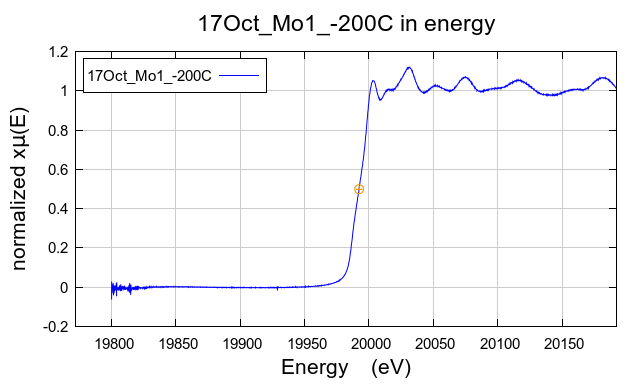
図 7.4 Data with a measurement problem that confounds ATHENA's algorithm for determining «E0».
In a situation like this, it can be useful to supply ATHENA with a bit more information about the data. The usual practice in ATHENA is to determine the absorbing element and edge from the data without input from the user. This practice can be over-ridden by enforcing the element and edge for a data set.
The dialog for this is located at . Selecting this pops uo the following dialog:
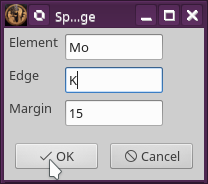
図 7.5 The element and edge enforcement dialog.
Specify the element of the absorber and the edge you are measuring. Doing so will force ATHENA to consider data to be of that element and edge. The «E0» will first be set to the tabulated value for the zero-valent lement. Then default parameter values will be set, then the «E0» parameter will be reset using the Fraction of edge step algorithm.
If you wish to later import data of another element or edge, it is imperative that you stop enforcement by selecting . Enforcing the incorrect element or edge will have profoundly undesirable consequences on the data processing.
DEMETER is copyright © 2009-2016 Bruce Ravel – This document is copyright © 2016 Bruce Ravel
This document is licensed under The Creative Commons Attribution-ShareAlike License.
If DEMETER and this document are useful to you, please consider supporting The Creative Commons.