10. データ解析
ATHENA を使うと様々な解析を行うことができます.ATHENA で行うことができるデータ解析には,FEFF は必要ありません.FEFF を用いたデータ解析は極めて大きなトピックであり,これは,ARTEMIS が目的とするところです.ATHENA に含まれているデータ解析技術は全て完全に経験的なものです.FEFF による理論に基づいた注意深く,洗練された EXAFS 解析の代わりにはなりませんが,この章で説明する経験的な手法はしばしば,データに対して持っている疑問に答えることができるでしょう.
ATHENA の解析ツールは,以下のように Analysis メニューからアクセスすることができます.
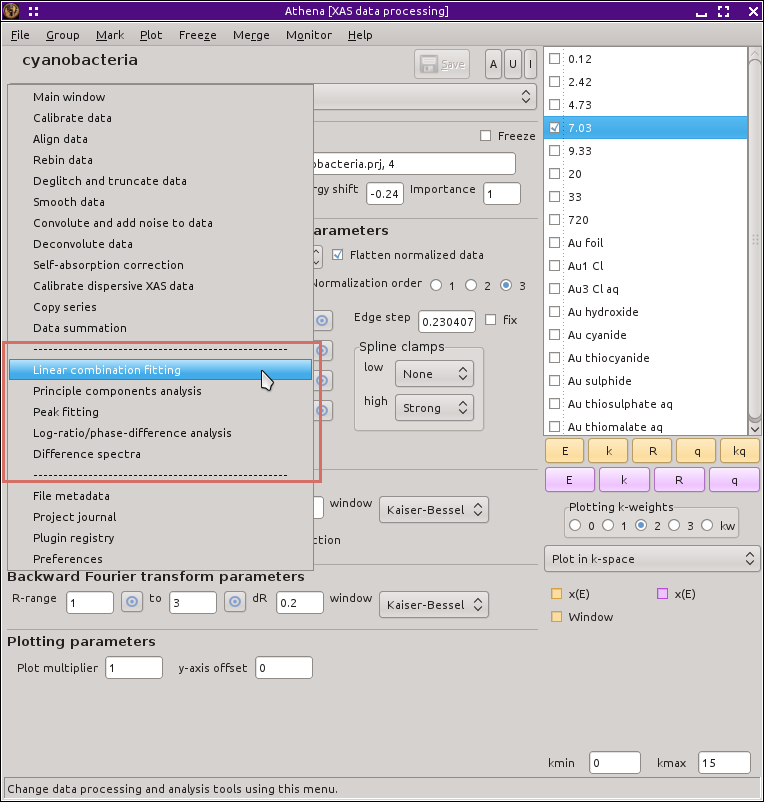
図 10.1 メインメニューのデータ解析ツール
バージョン 0.9.25 で追加: The states of the LCF, PCA, and peak fitting tools are now saved in the project file. These states will be restored from a project file if (and only if) the entire project file is imported. Importing only a subset of the groups in the project file will not trigger the import of the analysis states.
In each case, only the model is imported, not the results of the analysis. You will likely want to re-run the analysis after importing the project file with saved state for the analysis.
The recording of these states is turned on and off (default is on) by the ♦Athena→analysis_persistence configuration parameter. The reason you may want to disable saving state of the analysis tools is that importing from a project file containing that information can change the state of the group list and possibly other aspects of ATHENA.
Note that the project files with saved state for the analysis tools should be backwards compatible to earlier versions. Please file a bug report if this is not the case.
DEMETER is copyright © 2009-2016 Bruce Ravel – This document is copyright © 2016 Bruce Ravel
This document is licensed under The Creative Commons Attribution-ShareAlike License.
If DEMETER and this document are useful to you, please consider supporting The Creative Commons.